This is a great resource I found outlining innovative ways for teachers to use iPads in their classrooms. It is a public Google Doc and is constantly being updated by professionals.
http://edudemic.com/2011/04/ipads-in-school/
Thursday, April 28, 2011

Teacher Survey Comments
I asked 2 questions for teachers to leave a comment on, here are the answers I got:
Use the box below to talk about anything you think is great about the iPads:
Use the box below to talk about anything you think is great about the iPads:
- The ability for students to listen to books (and read them) in different languages. The engagement that can occur with students when using the iPads. Some of the apps that are geared directly toward specific content areas can be extremely beneficial. The ability to take a picture of a frame and then email the picture to the teacher to be graded.
- Voice Over and Dictation
- The kids like them because it is a break from the old ways, and anything they like sure makes it easier to get them on board, so to speak.
- The newest technology is what makes kids excited about learning. They WANT to use the iPads to do research!
- I love them! The only thing that sucks is when they have wrong answers and there is nothing we can do to fix them.
- A great hook for the kiddos!
- Easy to use.
- The ease of use/transition to get them out and put them away. They also really seem to capture the students' attention.
- Very user friendly
Use the box below to talk about any struggles or concerns you have with the iPads:
- It would be nice to have more "open-ended" apps where teachers can input and borrow information that pertains to their classroom and then be able to have the app create games, practices, etc. based on the information given by the teacher.
- The need for wi-fi school wide.
- Wireless connectivity issues, videos not working, that sort of thing. Once you use them a couple of times, you get pretty comfortable with them.
- The screens get dirty
- Not being able to keep up with what the students know about them! And no way to constantly monitor what they are doing.
- Just typing, still feels weird!
- They can be really slow at times, to process a task or use apps.
- I have found no apps that pertain to my subject area beyond things that could only be classified as elementary or time wasters.
Tuesday, April 26, 2011
More survey results
Here is a rating scale used on the survey:

I was surprised at the number of teachers that still want more training. There is no in between, they either really don't want anymore, or definitely want more. I thought it was encouraging to see that the majority of respondents were looking for more apps that apply to their subject area, and that they wanted the iPads in their classroom more often. I was also glad to see that for the most part they think that they are benefitting student learning in the classroom.
Wednesday, April 20, 2011
Teacher Survey
I am in the process of gathering some data about the iPad use in the building. I put out a survey yesterday and asked teachers to answer a few questions. Here are the results I have so far...


1. Rate how comfortable you are using the iPads in your classroom on a scale of 1-5. 1 being completely uncomfortable, I do not use them, and 5 being completely comfortable.


2. Rate how comfortable your students are using the iPads on the same scale of 1-5.

These two questions show me that our teacher and student comfort level are pretty much on the same level which is great. I think that makes for a much better learning experience for everyone involved.
3. Rate the students attitudes toward using the iPads in your classroom.

I was excited about these answers, I am glad the teachers see the students are excited about using the iPads because hopefully that will make them wan to use them in their rooms more!
I will share more results later, these are all I have tallied so far.
Tuesday, April 12, 2011
Citing an App (MLA style)
This has been a big question we have had here. There are great resources on the iPad to use for research, but how do you cite them in a paper or project, or even include them on a Works Cited page? I have done some research and come up with NOTHING!!! All the answers say to use a citation machine, well all the citation machines I have looked at don't have "application" as an option. I know that it is similar to a website, but it isn't the same thing. SO.... I have taken it upon myself to create a way to cite an app here at the Freshman Center. We will use this format until an official one comes out, actually I am shocked we are still waiting for one! Author's name (if applicable). "Name of App." Name of company that makes the app. Date app became available. App. Date of Access. Hope this helps anyone running into the same problems.
Monday, April 11, 2011
iPad Training Reflections
I had each teacher fill out a reflection after their training, here is what I learned: Apps Wanted Grammar HD $1.99 Introweb News Browser (Debate) $0.99 iBeat (free) virtuosopiano (free) KeyWiz $.099 Questions Can we copy folders from practice to other iPads in Algebra Touch? Are there more programs that have content heavy material? Would a stylus for each iPad be worth paying for (art)? What is the best way to put a test on the iPads so they can be used for read aloud students? A good editing/revising app? How can I incorporate more use of podcasts into my classroom? How do you cite an app? Things I learned Creating PDF's to use the read to feature iWorks is Microsoft compatible Using real time Google Docs on the iPad epub/ibooks You can turn read to on at anytime How to change grocery orders to ipad (cooking class) Multitasking Project Gutenberg-Free books (classics) that open in iBooks How to take a screenshot and email to a teacher Read-to for ELL Things that would help further my learning Applications for read-to software Look into eclicker /Response Ware Quarterly have an iPad brainstorm session with other teachers or Mac representative I think you can see, we got some good stuff out of these sessions. I will be looking into the questions and posting my responses.
Friday, April 8, 2011
Finally iPad Training
Today we are finally doing our iPad training with the Apple Rep today. I was a little frustrated, thinking this is too late, no one needs it anymore, but we are halfway through the day and I am changing my attitiude. The teachers that have come in so far, I feel like have learned a lot, and it has been customized to their level of comfort and need! Observations so far: Very one on one Good ideas shared Lots of questions about apps specifically related to content Questions asked that didn't have a clear/ready answer, were written down for further investigation and emails were exchnged to provide further insight Good app recommendations-Our trainer downloaded a bunch of apps based on the subjects we teach here--very personalized! Better when more than one member of a department were together for training
Thursday, April 7, 2011
iPads in Math
Our math teachers are getting ready to do a lesson study using the iPads Graphs App. Each PLC is supposed to do a lesson study to present to the faculty at the end of the year. I am excited for this. So far no department ha implemented one activity on the iPad throughout the department, they just do things individually. I am glad to see this changing. I think it is unfair that only the students who have teachers that are comfortable with the iPads get to use them. I think all classes within a department should be doing the same thing so that no kid gets left out, but that has not been the case. Way to go math department for stepping up! I think this is a step in the right direction and as more people get comfortable with the iPads this will become a regular thing.
So what are they doing? Well they are still in the planning phases but essentially, they are taking a lesson they usually do as a group that deals with interpreting data from different kinds of graphs, and having students work through it on their own on the iPad. The app is called graphs by tap to learn. It has 2 modes, learn and test. Students will go through the learning mode, and then when they test they will show their scores to the teacher as they go. One of the teachers is going to be absent on the day they are doing this, so I will get to do it with her class, I will share with you the results.
Here is a link to the app:
Thursday, March 31, 2011
iPad vs. iPad 2
I would be remiss if I did not mention the iPad2 with its recent launch, and what it has to offer education! I am one of the crazies who stood in line waiting for the iPad2, and I must say I am not disappointed. 
So what does the iPad2 have to offer that is so much better:
CAMERAS!!! -- I think the biggest upgrade for the iPad2 is the front and rear camera. This turns the iPad into a camera to take pictures and video, but also makes it available for applications like Skype and Face time.
This could be a big help to schools who implement iPads into their curriculum, it adds a another whole aspect of learning to the iPad.
Another big thing is the iMovie App. Now you can edit film on your iPad using the ultra user friendly iMovie.
A side note:
I don't know a lot about processors and speed, but the new processor in the iPad 2 is extremely fast and efficient.
While the iPad is great, the iPad 2 offers even more opportunities for use in the field of education.
Software Update 4.3.1
There is a software update for the iPad, 4.3.1, which is in conjuction with the release of the iPad 2. In order to update your iPads, it is quite a process, you must plug them in like you normally would to sync them. The kicker is that you can only update one iPad's software at a time, each update takes 5-7 minutes per iPad times 30 iPads = a lot of time! One thing I found helpful when doing this is to only plug in one iPad at a time. When I sync iPads i plug 7 in at a time using an adaptor. Since you can only update one at a time, there is no need to plug in more than this, if you do it just gets confusing, you don't know which ones have been updated. The update should: Fix graphics glitch Resolve bugs when connecting to a network Fixes image flicker when connecting using AV adaptor Resolve authenticating with some web services Although none of this means much to me, I am sure they will make the iPad run smoother, and I am updating all of mine, even though it is taking a little bit of time:)
Tuesday, March 22, 2011
iTunes U
iTunes U is something I was not familiar with until I started using iTunes in education. iTunes you is all FREE content. It is usually published or sponsored by a college or university, and contains videos, books, lectures, and audiobooks. More than 800 universities contribute to this collection. The only thing you need to remember is when you are syncing, go to the iTunes U tab at the top, and make sure your iPads are set to sync all new content from iTunes U. It is not a default setup, you have to choose it. Then it is as easy as 1, 2, 3.

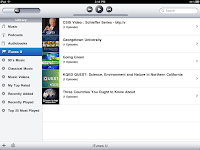
To learn more about iTunes U:
We mostly use videos from here. Since students cannot access Youtube from their accounts, we find videos and load them onto each iPad. Then all the student has to do is open up iTunes.
The process:
To open up iTunes click on the iTunes app in the bottom row of your iPad

Once in iTunes click on the iTunes U tab on the side of the screen

To learn more about iTunes U:
Monday, March 21, 2011
Websites and Blogs
Below are links to websites and blogs I look at regularly to update apps and other information on the iPads:
iPad News Updates
http://www.ipadnewsupdates.com/
Contains the latest information about the iPads. Includes tips and tricks as well as updates for the iPad.
iTunes Store: Top Free Apps
http://www.itunes.com
Recommends an app for education daily.
Mobile iEducator
http://mobileieducator.com/
Not all posts have to do with the iPad, but lots of app reviews and uses for different apps.
App Sites for Schools
Apps categorized by function:
http://ipadschools.wikispaces.com/
Apps for high schools:
http://palmbeachschooltalk.com/groups/ipadpilot/wiki/70925/High_School_iPad_Apps.html
Apps categorized by subject area:
http://teachwithyouripad.wikispaces.com/Grade+9-12+Apps
Applying apps to activities in your classroom:
http://www.apptivities.org/
iPad News Updates
http://www.ipadnewsupdates.com/
Contains the latest information about the iPads. Includes tips and tricks as well as updates for the iPad.
iTunes Store: Top Free Apps
http://www.itunes.com
Recommends an app for education daily.
Mobile iEducator
http://mobileieducator.com/
Not all posts have to do with the iPad, but lots of app reviews and uses for different apps.
App Sites for Schools
Apps categorized by function:
http://ipadschools.wikispaces.com/
Apps for high schools:
http://palmbeachschooltalk.com/groups/ipadpilot/wiki/70925/High_School_iPad_Apps.html
Apps categorized by subject area:
http://teachwithyouripad.wikispaces.com/Grade+9-12+Apps
Applying apps to activities in your classroom:
http://www.apptivities.org/
Saturday, March 19, 2011
Spring Break March 14-18
Our Spring Break was March 14-18, I will continue posting when we come back.
Friday, March 4, 2011
Our first Paid Apps!!!
So excited, last week we were able to purchase apps from the app store for the first time. After going through the painfully excruciating process of being a part of the volume purchasing program for education, it has finally paid off!
The Process
The process could not be easier. I send a list of apps we would like to our tech director.
He purchases them through our district volume account.
He sends me the link for the purchased app.
I click the link.
It opens up a window in iTunes.
I enter my account password.
The app is downloaded into my iTunes Library.
For more about the volume purchasing program check out this link
http://www.apple.com/itunes/education/
AND THE BEST PART IS...
All apps purchased through this program (if you buy 20 or more copies of each) are 50% off!!!
To read more about this check out this link or go to the Apple website
http://appsineducation.blogspot.com/2011/02/volume-purchase-program-50-off-apps-for.html
The Process
The process could not be easier. I send a list of apps we would like to our tech director.
He purchases them through our district volume account.
He sends me the link for the purchased app.
I click the link.
It opens up a window in iTunes.
I enter my account password.
The app is downloaded into my iTunes Library.
For more about the volume purchasing program check out this link
http://www.apple.com/itunes/education/
AND THE BEST PART IS...
All apps purchased through this program (if you buy 20 or more copies of each) are 50% off!!!
To read more about this check out this link or go to the Apple website
http://appsineducation.blogspot.com/2011/02/volume-purchase-program-50-off-apps-for.html
My Top Ten Apps
So as I promised, here are a list of the Top Ten Apps for our uses. Some are subject specific and some are reference tools.
Idea Sketch
A mindmapping tool. You can email final products to yourself for viewing and printing. A great way to organize your thoughts for any assignment.

A mindmapping tool. You can email final products to yourself for viewing and printing. A great way to organize your thoughts for any assignment.
Google Earth
 What more can I say, great for Geography, Google Lit Trips in English, and even math when measuring distances.
The Constitution for iPad

We use this in debate for researching Supreme Court cases as well as in Government.
Lit Charts: To Kill a Mockingbird

These are great and available for many other books as well. Provides themes, summaries, character sketches, entire book by chapter, and lots of other things all in one place.
Flashcardlet
 Uses Quizlet flashcards you create or that are already created to study particular subject areas.
Collins Math: Algebra

Provides an overview of every topic covered in Algebra I. Includes practice problems, video solutions and tutorials, as well as step by step instructions.
Shakespeare in Bits: Romeo in Juliet
 Also available in other Shakespeare plays. My absolute favorite!!! Provides entire text, modern translation, video of the play, one tap conversion of phrases to modern english, themes, quotes, summaries, and lots more!
 Also available in other Shakespeare plays. My absolute favorite!!! Provides entire text, modern translation, video of the play, one tap conversion of phrases to modern english, themes, quotes, summaries, and lots more!
Google

Provides easy access to all the Google applications you use daily, such as Google searches, Docs, Blogger, Reader, etc
Access My School Library
 Amazing, access to all the Gale databases in one spot. Login in with your school information once, and it is always remembered. Great resource for "reliable" sources.
Animoto

Just like the website only the app version. Make great, professional looking movies from your iPad anytime for free, just login to your account.
Tuesday, March 1, 2011
Response to Blog (What tools are essential)
On the Educational Origami Blog, there is a post discussing iPad, iPod, iPhone, and iEducation. In this post the writer discusses what he would place on his class set of iPads.
Once big difference here is that he has a class set of iPads. What I have, is a rotating set. That means each student does not have one iPad assigned just for him/her. I think this makes a big difference when purcahasing. You have to realize there will be 350 students using these 30 iPads. They cannot save their work, because the next user could easily erase it.
With that being said, here is the list he reported and what I have to say about it:
Pages, Keynotes, and Numbers -- these are the comparable pieces to Word, Excel, and Power Point. Because we have 3 other computer labs, I don't see these as a necessity (plus at $9.99 a pop per iPad, it can really add up!) When students need to do these tasks teachers just sign up to use the computer labs instead. I think the iPads are fairly hard to key on anyway and they encourage bad typing habits, so for these types of activities I think we will stick to computers!
iThoughts HD (mindmapping tool) -- while this may be awesome, I have never used it, again it is $9.99 per app. There are plenty of other ind mapping tools out there that can be used that are less expensive, and in some cases, free. The one we use with our iPads is Idea Sketch , and it is free.
Adobe Photoshop Express (image editor) -- This is a free app. I have not looked into a photo editing app, but with a reputation like Adobe has, I am sure it is the best of the best. We don't do a ton of photo editing, so I had not gotten this far in looking at apps, but I am putting it on my add list as we speak.
Good Reader (file management tool) -- THis app looks awesome, and would be great if each students had thier own iPad and could save and keep what they did. However this is not the case for us. That being said, I am going to look into this app, becuase I am sure you can email work to yourself, this may be a way around that problem.
Comic Strip CS -- This is a pretty cool app and would be nice to have, but not a necessity. It is only$0.99, so it would not be a huge monetary investment. The only thing I see about this is taht there are so many free comic strip makers online that you can use. However students definitely prefer to use the iPads, so it may be worth looking into.
Video Editor -- We do not have a video editor yet, again, we don't do a lot of video, but when we do we use Flip Cams. Since the iPads haev no USB port, it is easier to import the video onto a laptop. I am sure it would be great to edit video using the iPads though, just not feasible for us right now.
iTranslate -- This is one we do have and use frequently. It is an easy to use translator, that translates into or from whatever language you choose.
Google Earth -- FANTASTIC!!! We use this all the time for Geography class, as well as other classes. Great FREE app.
Audio Notes -- Again since everyone does not have their own iPad, we don't have a huge need for a note taking tool.
Projector -- not really sure what it does or how we would use it, plus it is$29.99 per app!
Skype -- This is a great tool. Would be even better if the iPad had a camera, if only we could have waited! (iPad 2 coming out in April is supposed to have 2 cameras!)
Extras:
Definitely agree with the need for headphones for each iPad. We have 30 and could not survive without them.
Would be nice to have USB adaptors for importing video, will look into this, wouldn't need 30, we only have 7 cameras.
SD card adaptor, we have one, but I haven't needed to use it yet, it is sometimes easier just to email.
While I don't have a need for a lot oft he tools mentioned, I am sure if we had classroom sets, or a 1 to 1 initiative I would feel differently about this. We would be using them everyday for every task; note taking, sharing files, typing, creating presentations, etc. Right now we are just using them as a tool to enhance what we are already doing. Every teacher probably gets the set about once every 2 weeks:(
I will follow up with a list of my own, what I feel are the most essential apps for our purposes.
Once big difference here is that he has a class set of iPads. What I have, is a rotating set. That means each student does not have one iPad assigned just for him/her. I think this makes a big difference when purcahasing. You have to realize there will be 350 students using these 30 iPads. They cannot save their work, because the next user could easily erase it.
With that being said, here is the list he reported and what I have to say about it:
Pages, Keynotes, and Numbers -- these are the comparable pieces to Word, Excel, and Power Point. Because we have 3 other computer labs, I don't see these as a necessity (plus at $9.99 a pop per iPad, it can really add up!) When students need to do these tasks teachers just sign up to use the computer labs instead. I think the iPads are fairly hard to key on anyway and they encourage bad typing habits, so for these types of activities I think we will stick to computers!
iThoughts HD (mindmapping tool) -- while this may be awesome, I have never used it, again it is $9.99 per app. There are plenty of other ind mapping tools out there that can be used that are less expensive, and in some cases, free. The one we use with our iPads is Idea Sketch , and it is free.
Adobe Photoshop Express (image editor) -- This is a free app. I have not looked into a photo editing app, but with a reputation like Adobe has, I am sure it is the best of the best. We don't do a ton of photo editing, so I had not gotten this far in looking at apps, but I am putting it on my add list as we speak.
Good Reader (file management tool) -- THis app looks awesome, and would be great if each students had thier own iPad and could save and keep what they did. However this is not the case for us. That being said, I am going to look into this app, becuase I am sure you can email work to yourself, this may be a way around that problem.
Comic Strip CS -- This is a pretty cool app and would be nice to have, but not a necessity. It is only$0.99, so it would not be a huge monetary investment. The only thing I see about this is taht there are so many free comic strip makers online that you can use. However students definitely prefer to use the iPads, so it may be worth looking into.
Video Editor -- We do not have a video editor yet, again, we don't do a lot of video, but when we do we use Flip Cams. Since the iPads haev no USB port, it is easier to import the video onto a laptop. I am sure it would be great to edit video using the iPads though, just not feasible for us right now.
iTranslate -- This is one we do have and use frequently. It is an easy to use translator, that translates into or from whatever language you choose.
Google Earth -- FANTASTIC!!! We use this all the time for Geography class, as well as other classes. Great FREE app.
Audio Notes -- Again since everyone does not have their own iPad, we don't have a huge need for a note taking tool.
Projector -- not really sure what it does or how we would use it, plus it is$29.99 per app!
Skype -- This is a great tool. Would be even better if the iPad had a camera, if only we could have waited! (iPad 2 coming out in April is supposed to have 2 cameras!)
Extras:
Definitely agree with the need for headphones for each iPad. We have 30 and could not survive without them.
Would be nice to have USB adaptors for importing video, will look into this, wouldn't need 30, we only have 7 cameras.
SD card adaptor, we have one, but I haven't needed to use it yet, it is sometimes easier just to email.
While I don't have a need for a lot oft he tools mentioned, I am sure if we had classroom sets, or a 1 to 1 initiative I would feel differently about this. We would be using them everyday for every task; note taking, sharing files, typing, creating presentations, etc. Right now we are just using them as a tool to enhance what we are already doing. Every teacher probably gets the set about once every 2 weeks:(
I will follow up with a list of my own, what I feel are the most essential apps for our purposes.
Monday, February 28, 2011
Draw Cast Activity
 So, my art teacher was looking for an activity to use the iPads with his students. He is beginning contour drawing. He took an iPad home every night for the last week looking for a way to do this. He came up with, what I think, is an awesome activity!
Contour drawing is focusing on the lines in an object and drawing from that. The idea is that you can draw the object with one line, without picking up your pencil. As an intro activity to this he took a picture of a shoe and a hand.


In this program you can choose an image to be your background. The students go in and set the first picture to their background. They then choose their writing ustensil, its thickness and color, and begin to trace around the picture. They are only to draw the lines that they are seeing.
Here is an example:

You then take away the background and you should be left with a great contour drawing of a shoe.
For example (not sure how great it is!)

I thought this was really cool (I can't draw at all, but it really looks like a shoe!)
Students email their pictures to the teacher and that is their grade for the day.
Lesson with student teacher follow-up
This activity went pretty well. I was in and out of the room all day, because of other things going on in the building, but for the most part this lesson was a success. The biggest snag we had when doing this was students getting logged onto the internet (through the internet filters) so that they could use the program.
One thing that she did, that was different than when other teachers have used them, was that students who had not completed their homework were not allowed to use the iPad. I like this and I don't.
Should using the iPads be a priveledge or should it be something that all kids are expected to be able to use as a resource. I have trouble with both sides of this. I agree if you can't get your work done you should have to do it, but should we give them class time to do it? And are we letting them out of another assignment because they didn't get a chance to do the iPad activity? Therefore are we requiring more work of students who stay up to date with their work?
I am not sure the answers to these questions, but I think it is something to think about if we are planning on expanding our iPad curriculum in the future.
One thing that she did, that was different than when other teachers have used them, was that students who had not completed their homework were not allowed to use the iPad. I like this and I don't.
Should using the iPads be a priveledge or should it be something that all kids are expected to be able to use as a resource. I have trouble with both sides of this. I agree if you can't get your work done you should have to do it, but should we give them class time to do it? And are we letting them out of another assignment because they didn't get a chance to do the iPad activity? Therefore are we requiring more work of students who stay up to date with their work?
I am not sure the answers to these questions, but I think it is something to think about if we are planning on expanding our iPad curriculum in the future.
iPad Problems
Today we ran into our first snag with the iPads. I took them into the classroom for use but I could not get the airport to work. We do not have wi-fi throughout the building so we use an airport that travels with our cart and iPads. We plug it into the internet and that provides localize wi-fi for that area. Anyway, this morning the airport was continually blinking amber. It should be green if it is working properly. So I tried unplugging and re plugging, and some other quick fixes, but nothing worked. So technology came over to look at it. It seems that the configuration set up with the port had been erased. It was not working correctly after that was reconfigured either, though. They took it with them to try some things, so we are without iPads today. I feel really bad for the teacher who had created a great lesson using them today. This is what I hate about technology!!! While I love so many things about it, when it doesn't work, it can completely ruin your day. I will let you know what we do to fix it.
Fixed!!!
Technology brought it back this afternoon working. The problem is...well we don't know. They have no idea why or how the configuration was deleted. Hopefully it is a fluke. If that is the case we won't need to worry about it, if not we will have to figure out what the problem is.
The fix, creating a new configuration on the airport and setting it up.
Fixed!!!
Technology brought it back this afternoon working. The problem is...well we don't know. They have no idea why or how the configuration was deleted. Hopefully it is a fluke. If that is the case we won't need to worry about it, if not we will have to figure out what the problem is.
The fix, creating a new configuration on the airport and setting it up.
Thursday, February 24, 2011
iPad Training for Teachers
So, tomorrow an Apple rep is coming to be in the library all day, teachers will come down during their plan to recieve a short training. I am very excited to see what the teachers think after they have been required to use them for 30 minutes. I will let you know how it goes. The rep has a sheet with teachers, their plans, and what subject they teach, so he should be prepared to offer them some content specific ideas for use with the iPads. I am so glad this is happening because so many teachers have not gotten a chance to see the iPad's full potential yet. This will give them the opportunity to do that!
Cancelled because of snow day...reschedule TBD.
Cancelled because of snow day...reschedule TBD.
Subscribe to:
Posts (Atom)